TECPLOT ASCII Files
(extension ".dat")
TEC is a data directory which
contains examples of TECPLOT ASCII files. TECPLOT ASCII files are used by
the TECPLOT program, which is a visualization program for
technical data. Typically, a user has an application program
(fluid flow solver, engineering stress program, aeronautic
simulator, heat flow program), that produces lots of data.
The user must write a subroutine that packages this data into
a TECPLOT ASCII file format ( there are several, including special finite
element forms). Then the user can postprocess the data, and
display it, by running TECPLOT.
TECPLOT ASCII File Characteristics:
-
ASCII (although TECPLOT can also create and use binary data files
which typically have the ".plt" extension);
-
Color is not associated with the data, but can be added
during postprocessing by the TECPLOT program, or by associating
variables "R", "G" and "B" with data, for instance;
-
2D or 3D data, and can have time dependence;
-
No compression (except for the binary data format option);
-
Geometric data is stored, but the user can also store associated
quantities such as pressure, temperature, or velocity.
-
Data is grouped into zones whose meaning is determined by the user.
Animation is achieved by starting with each zone being a
"time snapshot", and displaying one zone at a time.
Reference:
-
The TECPLOT home page:
http://www.datplot.com/
Sample Files:
-
3dgeom.dat,
3D geometries, using
using POINT and BLOCK formats. Contains 2 zones;
-
block_febrick_3d.dat,
3D finite element, scalar data T(X,Y,Z),
using the "BLOCK" datapacking and
"FEBRICK" element;
-
feblock_tet_3d.dat,
3D finite element tetrahedral data, using "BLOCK" datapacking
and "FETETRAHEDRON" element;
-
channel.dat,
2D channel flow, with two
boundary lines and an internal dashed line drawn, using POINT
format;
-
crystal_plot.dat,
2D data,
uses the BLOCK format, created by the
CRYSTAL_PLOT program;
-
cylinder_3d.dat;
-
cylinder_slice.dat;
-
cylindrical.dat,
uses the POINT format;
-
ell.dat,
a small dataset on an L-shaped 2D region.
-
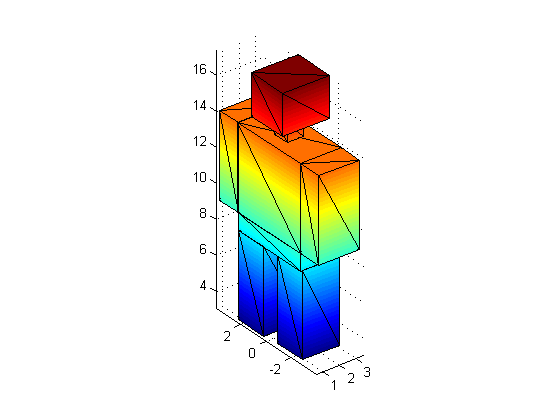
humanoid_quad.dat
color data (R,G,B)(X,Y,Z), for the SURFACE of a 3D human
figure, using "DATAPACKING=POINT" and the "FEQUADRILATERAL" element;
-
humanoid_tri.dat
color data (R,G,B)(X,Y,Z), for the SURFACE of a 3D human
figure, using "DATAPACKING=POINT" and the "FETRIANGLE" element;
-
humanoid_tri.png
a PNG image of the
humanoid;
-
movie.dat,
a very simple "animation"
of two tiny frames, using the POINT format. Contains 2 zones.
-
multzn2d.dat,
a multizone 2D plot,
using the POINT format; Contains 2 zones.
-
plane_slice.dat;
-
fepoint_brick_3d_01.dat,
3D finite element volume data T(X,Y,Z), using "DATAPACKING=POINT"
and "FEBRICK" element;
-
fepoint_brick_3d_02.dat,
3D finite element data PSI(X,Y,Z), representing a superconductivity
computation, using "DATAPACKING=POINT" and "FEBRICK" element;
-
fepoint_quad_2d.dat,
2D finite element data, using "DATAPACKING=POINT" and
and "FEQUADRILATERAL" element;
-
fepoint_tet_3d.dat,
3D finite element tetrahedral data, using "DATAPACKING=POINT"
and "FETETRAHEDRON" element;
-
fepoint_tri_2d_01.dat,
2D finite element data, (a very simple cube), uses
"DATAPACKING=POINT" and "FETRIANGLE" elements;
-
fepoint_tri_2d_02.dat,
a 2D finite element flow field, (U,V)(X,Y), Rho(X,Y), using
"DATAPACKING=POINT" and "FETRIANGLE" elements.
computed and written by the
FLOW5 program;
-
fepoint_tri_2d_03.dat,
a 2D finite element flow field, (U,V)(X,Y), Rho(X,Y), using
"DATAPACKING=POINT" and "FETRIANGLE" elements.
computed and written by the
FLOW6 program;
-
simp3dbk.dat,
simple 3D block volume data, density(X,Y,Z), using the BLOCK format;
-
simp3dpt.dat,
simple 3D point volume data, density(X,Y,Z), using the POINT format;
-
simpscat.dat,
a scatter plot using POINT format;
-
simpxy.dat,
a simple (X,Y(X)) plot of temperature versus distance;
-
simpxy2.dat,
an (X,Y(X)) plot of temperature versus distance. Uses weights. Contains 4 zones.
-
tiny.dat,
a "tiny" dataset.
You can go up one level to
the DATA page.
Last revised on 11 March 2010.